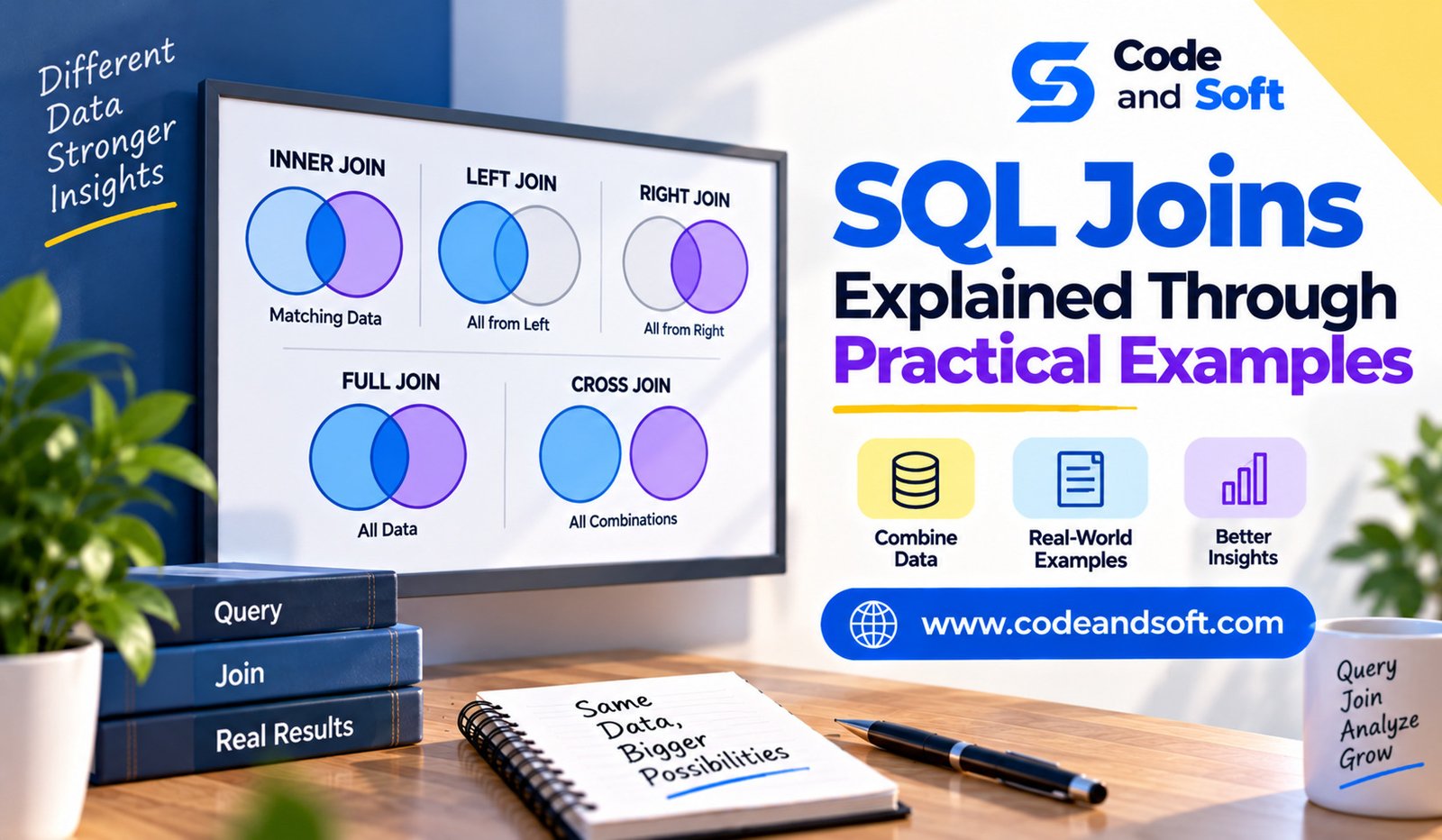

SQL joins are one of the most important concepts developers need to understand when working with relational databases. Real-world applications rarely store every piece of information in one table. Instead, data is usually divided into multiple tables and connected through relationships.
An e-commerce application may store customers in one table, products in another, and orders somewhere else. A school management system may separate students, courses, teachers, and enrollment records. SQL joins allow developers to bring related information together when an application needs it.
Learning SQL joins can initially seem confusing because there are several types, each designed for a different purpose. The easiest way to understand them is through practical examples and realistic database scenarios.
Why SQL Joins Are Important
Relational databases are designed around structured relationships. Instead of repeatedly storing the same customer information every time an order is placed, an application can store the customer once and use an identifier to connect that customer with multiple orders.
Imagine a customers table:
CREATE TABLE customers (
id INT PRIMARY KEY,
name VARCHAR(100),
email VARCHAR(150)
);
An orders table might contain:
CREATE TABLE orders (
id INT PRIMARY KEY,
customer_id INT,
order_date DATE,
amount DECIMAL(10,2)
);
The customer_id connects an order to a customer.
A join allows SQL to combine these related records.
INNER JOIN: Returning Matching Records
The INNER JOIN is one of the most commonly used joins.
It returns records where a matching value exists in both tables.
Suppose the customers table contains:
1 | Ananya | ananya@example.com
2 | Rahul | rahul@example.com
3 | Meera | meera@example.com
And orders contains:
101 | 1 | 2026-09-01 | 2500
102 | 2 | 2026-09-02 | 1800
You can combine customer and order information with:
SELECT customers.name, orders.id, orders.amount
FROM customers
INNER JOIN orders
ON customers.id = orders.customer_id;
The result would contain customers who have matching orders.
This is useful when an application only wants records that have a relationship.
For example, an online store may want a list of customers who have actually purchased something.
Using Aliases With Joins
Queries can become easier to read when table aliases are used.
Instead of repeatedly writing full table names:
SELECT customers.name, orders.amount
FROM customers
JOIN orders
ON customers.id = orders.customer_id;
You can write:
SELECT c.name, o.amount
FROM customers AS c
JOIN orders AS o
ON c.id = o.customer_id;
Aliases are especially useful when queries involve multiple joins or when table names are long.
They make complex SQL easier to scan and understand.
LEFT JOIN: Keeping All Records From the Left Table
A LEFT JOIN returns every record from the left table, even when there is no matching record in the right table.
This is useful when you want to find both matching and non-matching records.
Suppose a business wants a list of all customers, including customers who have never placed an order.
You could use:
SELECT c.name, o.id
FROM customers AS c
LEFT JOIN orders AS o
ON c.id = o.customer_id;
Customers with orders will have order information in the result.
Customers without orders will still appear, but the columns from the orders table will contain NULL.
This makes LEFT JOIN particularly useful for finding missing relationships.
Practical Example of LEFT JOIN
Imagine a subscription platform where some registered users have active subscriptions and others do not.
The application could use:
SELECT u.name, s.plan
FROM users AS u
LEFT JOIN subscriptions AS s
ON u.id = s.user_id;
This lets the application retrieve all users and determine which ones have subscription information.
A follow-up condition can identify users with no subscription:
SELECT u.name
FROM users AS u
LEFT JOIN subscriptions AS s
ON u.id = s.user_id
WHERE s.user_id IS NULL;
This can help businesses identify free users who have not yet subscribed.
RIGHT JOIN: Keeping All Records From the Right Table
A RIGHT JOIN works in the opposite direction.
It returns all records from the right table, even if there is no matching record in the left table.
For example:
SELECT c.name, o.id
FROM customers AS c
RIGHT JOIN orders AS o
ON c.id = o.customer_id;
The exact usefulness of RIGHT JOIN depends on query design and database support.
In practice, many developers prefer rewriting a right join as a left join by changing the order of the tables because left joins are often easier to read.
The important concept is understanding which table should contribute all records to the result.
FULL OUTER JOIN: Keeping Everything
A FULL OUTER JOIN combines the behavior of left and right joins. It returns matching records as well as unmatched records from both tables.
For example, suppose one table contains registered employees and another contains people assigned to projects. A full join could show employees with projects, employees without projects, and project assignments that do not have matching employee records.
A conceptual query looks like:
SELECT e.name, p.project_name
FROM employees AS e
FULL OUTER JOIN projects AS p
ON e.id = p.employee_id;
Not every database system supports FULL OUTER JOIN in exactly the same way, so developers should check the capabilities of their chosen database.
CROSS JOIN: Every Combination
A CROSS JOIN creates a combination between every row in the first table and every row in the second table.
Suppose a clothing store has:
Colors
Red
Blue
Black
And sizes:
Small
Medium
Large
A cross join could produce every possible color-size combination.
SELECT colors.name, sizes.label
FROM colors
CROSS JOIN sizes;
This might produce:
Red | Small
Red | Medium
Red | Large
Blue | Small
Blue | Medium
Blue | Large
Black | Small
Black | Medium
Black | Large
CROSS JOIN can be useful for generating combinations, but it should be used carefully. If both tables are large, the result can become enormous.
SELF JOIN: Joining a Table to Itself
A self join occurs when a table is joined with itself.
This is useful when records within one table have relationships with other records in that same table.
A common example is an employee hierarchy.
Suppose an employees table contains:
id
name
manager_id
The manager_id points to another employee in the same table.
A self join can retrieve each employee’s manager:
SELECT
e.name AS employee,
m.name AS manager
FROM employees AS e
LEFT JOIN employees AS m
ON e.manager_id = m.id;
The same table is given two aliases so SQL can treat one reference as the employee and the other as the manager.
This technique is useful for organizational structures, category hierarchies, threaded comments, and other data with self-referencing relationships.
Joining More Than Two Tables
Real applications often require multiple joins.
Consider an online store with three tables:
customers
orders
order_items
You could retrieve a customer’s orders and the products associated with them by joining several tables together.
For example:
SELECT
c.name,
o.id AS order_id,
oi.product_id,
oi.quantity
FROM customers AS c
JOIN orders AS o
ON c.id = o.customer_id
JOIN order_items AS oi
ON o.id = oi.order_id;
The database follows the relationships between the tables and produces a combined result.
When writing multi-table joins, make sure each relationship is clearly defined. Unnecessary or incorrect join conditions can produce duplicate or unexpected records.
Joins With Filtering
Joins are commonly combined with WHERE clauses.
For example, a store might want to find customers who placed orders worth more than ₹5,000:
SELECT c.name, o.amount
FROM customers AS c
JOIN orders AS o
ON c.id = o.customer_id
WHERE o.amount > 5000;
The join establishes the relationship, while the WHERE clause filters the resulting records.
This pattern appears frequently in business applications and reports.
Joins With Aggregation
SQL joins can also be combined with aggregate functions.
Suppose you want to calculate how much each customer has spent:
SELECT
c.name,
SUM(o.amount) AS total_spent
FROM customers AS c
JOIN orders AS o
ON c.id = o.customer_id
GROUP BY c.id, c.name;
The database joins customers with their orders, groups the results by customer, and calculates the total amount.
This type of query is useful for sales reports, customer analysis, dashboards, and business applications.
Common SQL Join Mistakes
Beginners often make a few predictable mistakes when working with joins.
One common problem is forgetting the join condition. This can create a Cartesian product where every row from one table is combined with every row from another.
Another mistake is using INNER JOIN when unmatched records also need to be included. For example, using an inner join to find customers without orders will not work because customers without orders disappear from the result.
Duplicate rows can also appear when joining one-to-many relationships. Developers need to understand the relationship between the tables and use grouping or other techniques when necessary.
Understanding Join Performance
Correct SQL is important, but performance also matters.
Large joins can become expensive when tables contain millions of rows. Appropriate indexes on relationship columns can help the database find matching records more efficiently.
For example, a frequently used relationship between customers.id and orders.customer_id may benefit from suitable indexing.
Developers should also avoid joining tables when the information is unnecessary.
When a query becomes slow, examining the database’s execution plan can provide useful information about how the join is actually being processed.
Choosing the Right Join
The easiest way to choose a join is to ask what records need to remain in the final result.
Use INNER JOIN when only matching records matter.
Use LEFT JOIN when every record from the first table should remain, even without a match.
Use RIGHT JOIN when the second table should provide all records.
Use FULL OUTER JOIN when unmatched records from both sides matter and the database supports it.
Use CROSS JOIN when every possible combination is required.
Use a SELF JOIN when records within the same table are related to one another.
Thinking about the desired result first makes join selection much easier.
Final Thoughts
SQL joins provide the connection between separate pieces of relational data. They allow developers to combine customers with orders, employees with managers, products with categories, and countless other real-world relationships.
The most important joins to understand are INNER JOIN, LEFT JOIN, RIGHT JOIN, and FULL OUTER JOIN, along with specialized patterns such as cross joins and self joins.
Rather than memorizing syntax alone, practice joins using realistic tables and ask simple questions about the data. Who has placed an order? Which customers have no orders? Which employees report to a manager? How much has each customer spent?
Once you start thinking about SQL joins in terms of these practical questions, the syntax becomes much easier to understand. With regular practice, joins become one of the most powerful tools for retrieving meaningful information from relational databases.